Your Canvas due dates, in Google Tasks and Calendar. Automatically.
Canvas2Google copies your Canvas assignments into Google Tasks and your Canvas events into Google Calendar, and keeps them up to date every day.
Sign in with GoogleAccess is limited to invited accounts for now.
How it works
- Sign in with Google. No new password; Canvas2Google never sees your Google password.
- Paste your Canvas calendar feed link. In Canvas: Calendar → Calendar Feed.
- That's it. Assignments appear in a Google Tasks list named “Canvas” and events in a Google Calendar named “Canvas”. Changes in Canvas are updated daily, and you can sync any time.
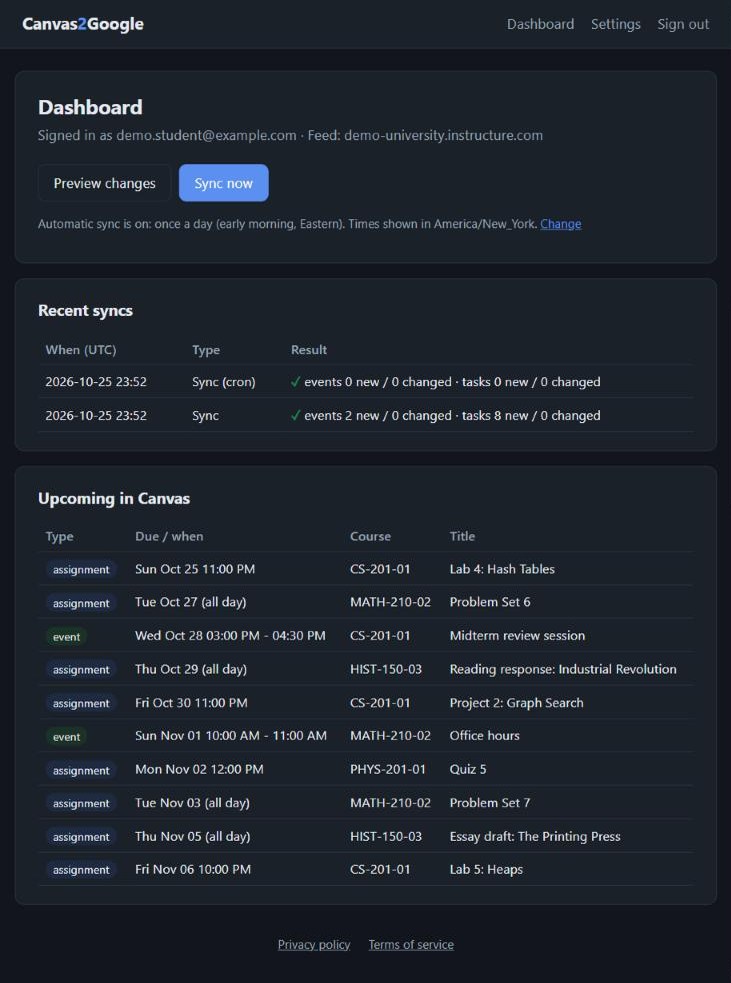
Dashboard with demo data.
What it asks Google for, and why
| Permission | Why it's needed |
|---|---|
| Your email address | To recognize you when you sign in. |
| Calendars this app creates | To create the “Canvas” calendar and keep its events in sync. It can't see or change your other calendars. |
| Google Tasks | To create the “Canvas” task list and keep its tasks in sync. It only works in that list. |
Built with security in mind
- Your Canvas feed link and Google access are encrypted, with the key kept separate from the database.
- Your data is used only to run the sync. It's never sold, shared, or used for ads.
- Delete your account any time: everything is removed and Google access is revoked.
- The code is open source, with a public threat model.
A student project. Not affiliated with Instructure (Canvas) or Google.